The official Zid Bus mobile app is now available on both Android and iOS. Fast loading, a clean interface, and secure payments — it's the best gaming app experience in Bangladesh.
Virus-free and completely safe file
Most people today do everything on their smartphones. Whether you're on a break at work, commuting, or winding down at night — who wants to open a laptop just to play a game? The Zid Bus mobile app is built exactly for that. Pull out your phone, open the app, and jump into your favorite game within seconds.
The Zid Bus app is built with Bangladeshi users in mind. The interface is clean and intuitive — with easy navigation and a color scheme that's easy on the eyes. Even first-time users can figure everything out within five minutes, no guide needed.

The Zid Bus app truly delivers on performance. It takes up around 50 MB of storage, yet packs in an entire gaming world — from fish games to Live Casino, bingo, slots, and much more. The app runs smoothly on Android 6.0 and iOS 12 or above. No lag or freezing, even on older devices.
Another great feature of the Zid Bus app is push notifications. When a new promotion launches, a bonus offer drops, or a tournament is about to begin, you'll get an alert straight to your phone. No need to keep checking the browser — the app keeps you in the loop.
Zid bus takes security seriously. The app uses two-factor authentication at login, and all transactions are SSL encrypted. Deposits and withdrawals via bKash, Nagad, and Rocket are fully secure and fast — your balance is updated within minutes of making a deposit.
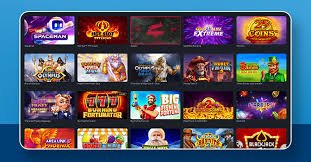
Many users ask — what's the difference between playing in a browser versus the app? The difference is clear. The app loads faster because parts of the game are cached locally. Touch controls are smoother and more responsive. Biometric login means you can sign in instantly with your fingerprint or face — no password needed. There's also the option to play some demo games in offline mode.
Zid Bus rolls out app updates regularly. Each update adds new games, improves performance, and fixes any bugs. The interface is continuously refined based on user feedback. Keep auto-update enabled to always have the latest version.

Customer support on the Zid Bus app is worth highlighting too. You can resolve any issue directly through the in-app live chat. The support team responds in English, so there's no communication barrier. Replies typically come within a few minutes.
Simply put, the zid bus mobile app is more than just a gaming app — it's a complete gaming ecosystem. From registration and deposits to playing, winning, and withdrawals, everything is in one place. For anyone who wants a truly great mobile gaming experience, zid bus is the top choice.

| Version | V3.2.1 |
| Size | 50 MB |
| Android | 6.0+ |
| IOS | 12.0+ |
| Update | June 2026 |
| Language | Bengali, English |
Make your first deposit through the Zid Bus app and claim a special welcome bonus.
If you run into any issues downloading or installing the app, our support team is always ready to help.
What sets the app apart from the rest
With optimized code and smart caching technology, games load in seconds — even on a slow connection.
Log in instantly with your fingerprint or Face ID — no more remembering passwords.
Real-time updates on bonuses, tournaments, and special offers — delivered straight to your phone.
All data and transactions are protected with 256-bit SSL encryption. Your information remains completely private.
Deposit and withdraw via bKash, Nagad, and Rocket in just a few minutes — no long waits.
Fish Game, Live Casino, Bingo, slots, and hundreds more — all in one place on the app.
Easy to install on both Android and iOS
Download the Android APK file from the Zid Bus website or app page. The file is only 50 MB.
Go to Settings > Security > Unknown Sources and enable it. This allows third-party APK installation.
Tap the downloaded APK file and press the "Install" button. Once installation is complete, tap "Open".
Already have an account? Log in. New here? Register in under 2 minutes.
Open zidbus.com in Safari and go to the App section. Tap the iOS download link.
Follow the on-screen instructions and install the Configuration Profile. Then go to Settings and tap Trust.
Tap the zid bus icon on your home screen to launch the app. The first launch may take a few seconds.
Enable Face ID or Touch ID from the app settings. From then on, you'll be logged in within a second.
Both work — but see the difference for yourself
| Features | Zid Bus App | Mobile Browser |
|---|---|---|
| Loading Speed | Lightning Fast | Comparatively Slower |
| Biometric Login | Full Support | None |
| Push Notifications | Real-Time | None |
| Data Usage | Low (Cached) | More |
| Offline Demo | Available in select games | None |
| Exclusive Bonus | App Bonus Available | None |
| Installation Required | Yes (Once) | Not Required |
| Touch Response | Optimized | Standard |
The Zid Bus app is built for entertainment — not as a source of income. Players must be 18 or older. Never bet beyond your budget. If gaming feels out of control, reach out to our support team.
Register, install the app, and enjoy an exclusive app bonus on your first deposit.